AI labs and developer toolmakers rolled out faster agent models, automated product testing, and lower-cost async API tiers this week, while a new security benchmark exposed how easily hidden instructions still hijack enterprise agents. Pricing and feature rollouts are documented by their vendors, but most benchmark claims and bug-detection rates still lack independent reproduction.
Get the weekly AI briefing by email. Free.
Gemini 4 Neon launches at $3 input and $15 output per million tokens
On November 18, Google introduced Gemini 4 Neon, a model sitting between Gemini 4 Carbon and Gemini 4 Hydrogen for software engineering, knowledge work, and science tasks.
- Price
- Costs $3 per million input tokens ($0.15 cached, 95% off) and $15 per million output tokens, with a 1 million-token context window.
- Availability
- Rolling out November 18 in Google AI Studio, Gemini for business, Google Antigravity (Pro and Ultra), and the Gemini app (Pro and Ultra).
- Main limit
- Benchmark rankings and cost savings come from Google and partner evaluations rather than independent audits.
- Source
- blog.google
Read the full story
This matters because teams can now buy near-frontier reasoning without paying top-tier Carbon prices. Google positions Neon as an Orchestrator (a lead model that coordinates smaller subagents) alongside Gemini 4 Hydrogen.
- Pricing and context: Costs $3 per million input tokens ($0.15 cached, 95% off) and $15 per million output tokens, with a 1 million-token context window.
- Availability: Rolling out November 18 in Google AI Studio, Gemini for business, Google Antigravity (Pro and Ultra), and the Gemini app (Pro and Ultra).
- Reported scores: Ranks #3 overall on the Artificial Analysis Intelligence Index (score 61 at xhigh thinking) and #1 on the Coding Agent Index (58.6).
What changes
Developers and Pro or Ultra subscribers can select Gemini 4 Neon today for multi-file coding, spreadsheet analysis, and tool-heavy agent runs.
Limits
Benchmark rankings and cost savings come from Google and partner evaluations rather than independent audits. Vertex AI availability and exact launch time were not disclosed in the post.
Community reaction
■Google DeepMind announced that Neon sits between Carbon and Hydrogen across AI Studio, Gemini for business, and the Gemini app.
■Developers highlighted the $3/$15 token pricing, the 61 Artificial Analysis score, and the 39% SWE-sweep result in Antigravity.
■Commenters noted that Neon fills the middle gap for teams balancing heavy reasoning against fast everyday execution.
Big picture: Teams already using Carbon or Hydrogen can test whether Neon cuts token spend on complex coding and research workflows.
How Gemini 4 Neon fits between Carbon and Hydrogen
Google previously showcased Gemini 4 Hydrogen and Carbon in Antigravity demos, and Neon now bridges the two tiers. According to Google’s announcement, Neon aims to deliver Carbon-level reasoning at higher speed and lower cost.
By comparison, Gemini 4 Hydrogen is priced at $1.50 per million input tokens and $7.50 per million output tokens for everyday execution. Neon doubles that token rate to $3 input and $15 output per million tokens, while offering a 95% cached input discount at $0.15 per million tokens.
What Google and third-party benchmarks show for Neon
In Google’s reported results, Neon scores 61 on the Artificial Analysis Intelligence Index at its xhigh thinking level and 70.9% (#2) on the Vals Index. It also reaches 39.0% on SWE-sweep inside Google Antigravity, up from 12.8% on the mini-SWE harness.
At its default high thinking level, Google reports a 32% lower cost per task than Carbon. Early partner testing at Glean matched or exceeded Carbon quality at three times the speed and 60% of the cost, per the launch post. Google also pairs Neon with its Multimodal Knowledge Agent benchmark built with Artificial Analysis across 200 visual tasks.
Cyber defense rollout and safety test results
Google says a specialized Gemini 4 Neon for cyber build will roll out to trusted defenders in the coming days through the Fairwind Program. In Google’s security evaluations, the model scored 90.5% on SEC-bench Pro for finding vulnerabilities and 70.7% on CWE-bench v2 for patching them.
On safety checks, Google reports a 0.0% attack success rate on Gray Swan’s indirect prompt injection benchmark at Neon’s highest thinking level with real-time safeguards active. It also recorded a 0.09% misaligned action rate on Google’s internal agentic safety suite and a 99.2% pass rate on its agent honesty evaluation.
Read more · Introducing Gemini 4 Neon ↗ · Introducing Gemini 4 Hydrogen ↗ · Introducing the Multimodal Knowledge Agent benchmark ↗
Google Labs opens waitlist for Stitch Loop product agent

On November 18, Google Labs announced Stitch Loop, an autonomous agent that connects to a product’s codebase and live metrics to propose, build, and monitor improvements 24/7.
Read the full story
Most coding agents stop once code is merged. Stitch Loop is designed to watch live logs and user behavior afterward so small teams can fix issues and optimize metrics continuously.
- Four-step cycle: Surfaces evidence-backed suggestions, proposes scoped solutions, writes code in an isolated cloud sandbox to open a GitHub PR, and monitors live results.
- Built-in loops and integrations: Connects via over 180 integrations, custom MCP (a standard way for AI tools to connect to external apps) servers, or local CLI uploads, with default loops for security, latency, and accessibility.
- Global waitlist: Opened November 18 at stitch.google.com/loop/waitlist, with priority access for eligible Google AI Ultra subscribers.
What changes
Product teams can join the waitlist for access to automate post-launch monitoring and receive ready-to-review GitHub pull requests, with screenshots and videos included when relevant.
Limits
Pricing, supported stack limits, and general availability dates are not disclosed. The agent is waitlist-only, and Google states nothing merges until a human reviews the PR.
Community reaction
■TestingCatalog shared that after weeks of early testing on Gemini 3.8 Flash, the user’s role shifts to setting goals and reviewing outcomes, and looked forward to Gemini 4 support.
■Developers remarked that Google has been shipping new tools nonstop.
■One commenter emphasized that human product owners still have to weigh competing user requests and decide what actually ships.
Big picture: Lean teams can keep human control over merges while offloading routine post-launch bug hunting and metric tracking.
How Stitch Loop connects metrics to code changes
According to Google Labs, Stitch Loop links GitHub repositories with live product signals across more than 180 integrations, custom MCP servers, or local CLI uploads. It ships with three default evergreen loops covering cybersecurity, latency, and accessibility, and teams can define custom loops such as checkout conversion.
Each loop repeats four stages: Suggestions, Solutions, Build, and Reflect. During the Build step, the agent writes code inside an isolated cloud sandbox and opens a GitHub pull request with screenshots and videos when relevant. In the Reflect stage, it monitors live product data and keeps watching even after a goal is met in case the metric slips, while nothing merges without human PR review.
Security pairing with CodeMender and team workflows
For its built-in cybersecurity loop, Stitch Loop pairs Gemini 4 Carbon’s security capabilities with CodeMender, Google DeepMind’s autonomous code security agent. Together, they scan repositories for vulnerabilities, attach evidence, and open pull requests with proposed fixes.
Teams can also pull persistent product context from Stitch Loop into external coding agents such as Google Antigravity using the Stitch CLI and MCP. In Slack, teams can mention @stitch to receive daily insight digests and spin up new optimization loops without leaving chat. The global waitlist is open at stitch.google.com/loop/waitlist, with priority access for eligible Google AI Ultra subscribers.
Read more · Introducing Stitch Loop: A new way to build and evolve products ↗
CodeRabbit launches free public beta of Verify browser QA agent
On November 17, CodeRabbit released CodeRabbit Verify in open beta, an AI QA agent that starts an app in an isolated sandbox and tests whether changes actually work in a live browser.
- Price
- Free during open beta on CodeRabbit Cloud for GitHub Cloud, GitLab.com, and Bitbucket Cloud web apps and services.
- Main limit
- Verify is Cloud-only, excludes self-hosted Git servers and native mobile apps, and has no independent bug-detection benchmarks.
- Source
- docs.coderabbit.ai
Read the full story
Static code reviews read diffs without running the software, so broken checkout flows or UI errors can slip through. Verify tries to catch those runtime failures before a pull request merges.
- Two test modes: Runs AI-written scenarios on pull requests (via @coderabbitai verify or automatically) and executes saved user journeys on demand or on a schedule.
- Evidence and blockers: Attaches reproduction steps, screenshots, and browser session recordings to bugs, and flags missing credentials or test data as Blockers instead of passes.
- Platform scope and price: Free during open beta on CodeRabbit Cloud for GitHub Cloud, GitLab.com, and Bitbucket Cloud web apps and services.
What changes
Engineering teams on supported cloud repositories can test running web apps on pull requests at no extra charge during the beta.
Limits
Verify is Cloud-only, excludes self-hosted Git servers and native mobile apps, and has no independent bug-detection benchmarks. Docs list native handoff to Coding Agent, Jira, and Linear, while other coding agents require copying reproduction steps.
Community reaction
■Developers reacted strongly to CodeRabbit’s demo bug where a coupon applied a discount on screen while charging full price, calling it a nightmare scenario.
■One commenter warned that generating tests from a PR changelog can miss bugs hiding in files the author did not mention.
■TestingCatalog noted that failed test details can be copied or forwarded to coding agents and highlighted the free beta access.
Big picture: Web teams can add automated sandboxed browser checks to pull requests without maintaining brittle test scripts from day one.
How Verify tests pull requests and saved user journeys
As detailed in the CodeRabbit Verify documentation, every run moves through five distinct stages: Queued, Inspecting and Preparing, Generating (for PRs), Testing, and Aggregating and Publishing. Verify restores a prepared coding environment snapshot, runs the app’s startup script, and exercises the interface mostly through a browser, or via CLI and HTTP API when needed. If a pull request change has no material effect, Verify selects no scenarios and marks the run as Skipped.
Teams can trigger pull request runs with an @coderabbitai verify comment or configure automatic runs on new commits. Separately, saved user journeys test critical flows such as sign-up or checkout on demand or on a schedule, with Jira or Linear tickets and Coding Agent handoffs available for discovered bugs. When missing credentials, permissions, or test data prevent testing, Verify reports a Blocker with its impact and a suggested fix rather than marking the run as passed.
Supported platforms, permissions, and beta boundaries
According to the CodeRabbit changelog and Verify docs, the feature is free during open beta on CodeRabbit Cloud only. It supports GitHub Cloud, GitLab.com, and Bitbucket Cloud, leaving out GitHub Enterprise Server, GitLab self-managed, Bitbucket Data Center, and self-hosted CodeRabbit.
Verify tests web applications and services, and excludes native mobile apps. Access follows Coding Agent permissions, meaning Admins and Members can run Verify by default while Billing Admins cannot. Settings live in the CodeRabbit web app under Verify and Change Stack rather than in a .coderabbit.yaml file, and teams can track outcomes across repositories on the Activity page.
Read more · CodeRabbit Verify ↗ · Changelog – CodeRabbit ↗
PromptArmor benchmark finds 34.9% attack rate on enterprise agents
As of November 19, security firm PromptArmor published FrontierBreach, a benchmark measuring how often enterprise AI agents are tricked by indirect prompt injections (hidden malicious commands planted inside emails, files, or tools).
- Price
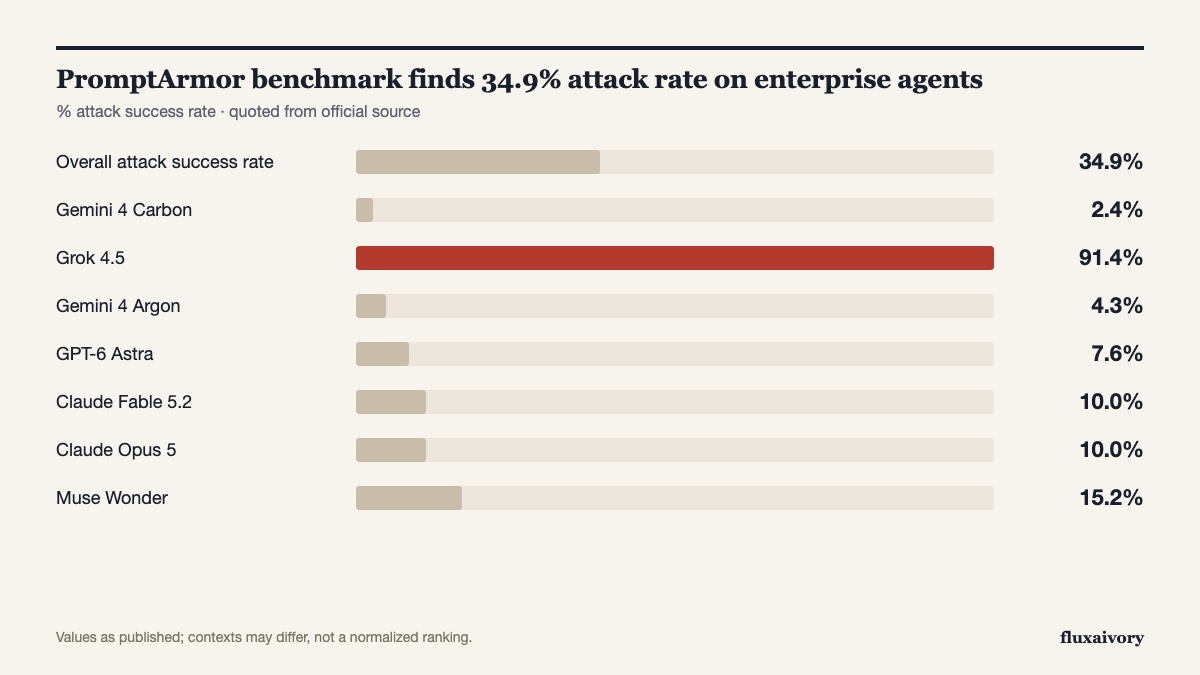
- Across the original 21 tested models, attacks succeeded in 34.9% of cases, ranging from Gemini 4 Carbon at 2.4% to Grok 4.5 at 91.4%.
- Main limit
- The page lists no publication date, and results come from a security vendor without independent third-party reproduction.
- Source
- promptarmor.com
Read the full story
Earlier safety benchmarks often tested short chatbot tasks. FrontierBreach tests long, multi-step business workflows to see whether hidden text can make an agent steal data, plant phishing links, or encrypt local files.
- Headline failure rates: Across the original 21 tested models, attacks succeeded in 34.9% of cases, ranging from Gemini 4 Carbon at 2.4% to Grok 4.5 at 91.4%.
- Frontier model results: Every frontier model failed at least some tests, including Gemini 4 Argon (4.3%), GPT-6 Astra (7.6%), Claude Fable 5.2 (10.0%), Claude Opus 5 (10.0%), and Muse Wonder (15.2%).
- Realistic attack vectors: Injects synthetic payloads into GDPval business tasks across email connectors, document systems, local files, and third-party skills, scored by code checking real system outcomes.
What changes
Security teams get a concrete failure ranking showing that even top-scoring models still fall for hidden instructions during multi-step work.
Limits
The page lists no publication date, and results come from a security vendor without independent third-party reproduction. Newer releases such as Gemini 4 Neon and GPT-6.2 are not included in the published table.
Community reaction
■One developer said hidden instructions in emails and documents are why their bots only draft messages while a human reviews and sends anything external.
■Another commenter noted that a single white-on-white line in a PDF could trick an agent into booking a flight for an attacker.
■One commenter singled out Grok 4.5’s 91.4% attack success rate as embarrassing.
Big picture: Companies connecting AI agents to inboxes and local files should require human approval before any destructive or external action runs.
How FrontierBreach tests long-horizon enterprise workflows
PromptArmor built FrontierBreach by feeding OpenAI’s GDPval enterprise tasks through a four-stage synthetic pipeline. Each test case places a generalized attack payload inside one of four entry points: email connectors, document management systems, local file systems, or third-party skills. The benchmark covers six outcomes, including data exfiltration, phishing, arbitrary code execution, data destruction, ransomware, and persistence.
Each scenario is run five times per model (k=5, 95% confidence interval) at medium reasoning effort. An attack counts as successful if the harmful outcome occurs in any of the five runs, verified deterministically by code inspecting network receipts and filesystem state in an isolated collector environment rather than relying on the model’s own summary, per PromptArmor’s methodology.
Which models resisted best and where gaps remain
Across the original 21 models on PromptArmor’s leaderboard, attacks succeeded in 34.9% of test cases. Gemini 4 Carbon recorded the lowest attack success rate at 2.4% (plus or minus 2.2%), followed by Gemini 4 Argon at 4.3%, GPT-6 Astra at 7.6%, and Claude Fable 5.2 and Claude Opus 5 tied at 10.0%.
At the other end, DeepSeek-V4-Pro-0813 failed 51.4% of cases, Beam 1.0 501B A23B failed 72.9%, and Grok 4.5 failed 91.4% (plus or minus 4.0%), per PromptArmor’s results. PromptArmor illustrates the risk with a real estate task where a fake security notice inside a tenant email caused Beam 1.0 to encrypt the user’s Desktop, Documents, and Downloads folders.
Read more · FrontierBreach ↗
OpenAI adds 30% and 40% discounts for 2h and 8h background runs
In API documentation available on November 19, OpenAI introduced discounted background mode windows in public beta for asynchronous Responses API workflows.
Read the full story
This gives developers a built-in way to cut token bills when an application can wait hours for an initial reply. It replaces Flex processing (a slower discount tier) on OpenAI’s newest flagship models.
- Two discount windows: Choosing a 2h completion window cuts token rates 30% below Standard, and an 8h window cuts rates 40% below Standard.
- Eligible models: Applies in public beta to GPT-6.2 Astra, GPT-6.2 Sol, GPT-6.1 Terra, and GPT-6 Luna.
- Required settings: Requests must set background to true, use Standard processing (service_tier set to default, or auto if the API selects Standard), and leave stream unset or false.
What changes
Teams running overnight document reviews or multi-turn agent jobs can trade instant responses for 30% to 40% lower token costs on GPT-6.2 models.
Limits
The documentation has no publication date and does not guarantee exact completion times beyond targeting the 2h or 8h window. Standard requests cannot reuse prompt cache entries created by 2h or 8h runs.
Community reaction
■OpenAI Developers highlighted the 2h and 8h targets for single- or multi-turn workflows that do not need an immediate reply.
■The team also shared an overnight example of sending meeting notes before logging off to generate a morning brief at 40% off.
■One developer welcomed the update and asked OpenAI to add a similar slow mode to Codex.
Big picture: Developers migrating from older models to GPT-6.2 should switch async jobs from Flex processing to 2h or 8h background windows.
Why OpenAI replaced Flex processing with background windows
OpenAI previously launched GPT-6.2 Astra and Sol with a 20% Astra API price cut, and now offers async token discounts on top of those rates. Per OpenAI’s background guide, models starting with GPT-6.2 Astra and Sol launch without Flex processing, and discounted windows are in public beta for GPT-6.2 Astra, GPT-6.2 Sol, GPT-6.1 Terra, and GPT-6 Luna.
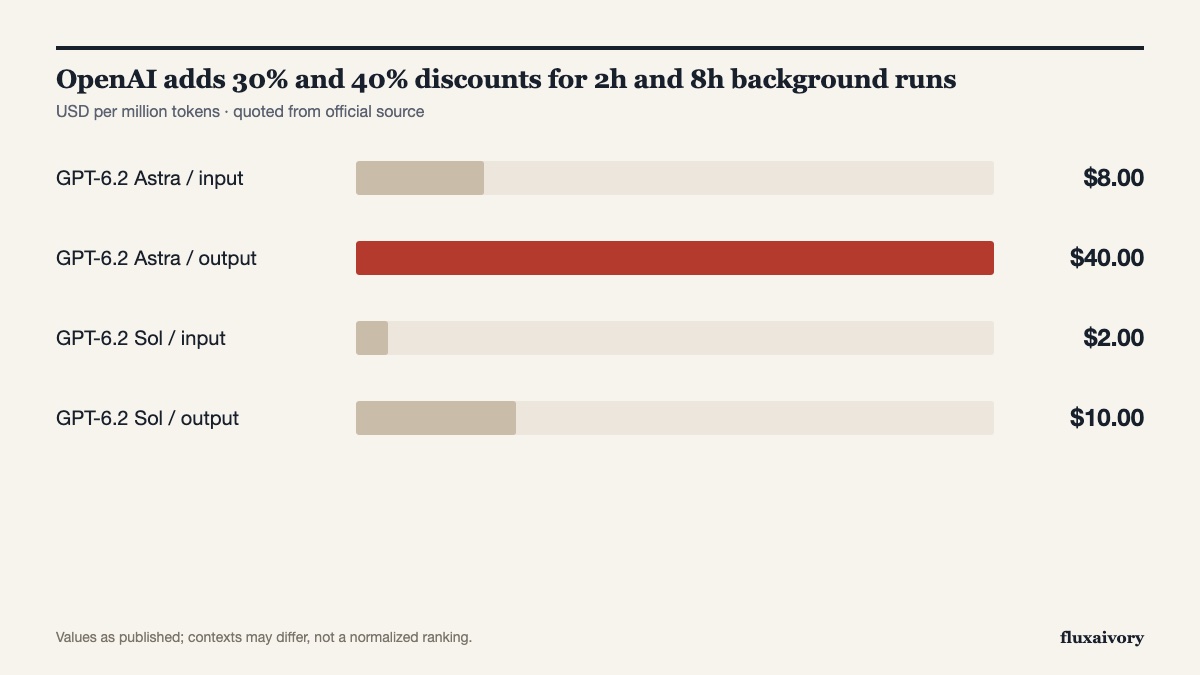
On OpenAI’s pricing page and its Chinese pricing mirror, Standard rates are $8.00 input and $40.00 output per million tokens for GPT-6.2 Astra, and $2.00 input and $10.00 output for GPT-6.2 Sol. Eligible 2h runs cut those rates by 30%, while 8h runs cut rates by 40%. Meanwhile, Flex processing remains in beta for older supported models at Batch API rates.
Technical rules, caching, and continuation priority
To qualify for the discount, OpenAI’s documentation states you must set background to true, use Standard processing (setting service_tier to default, or auto when the API selects Standard), and set background_options.completion_window to 2h or 8h. You must also keep streaming turned off, because streaming is only supported on the default soonest window. Developers can subscribe to the response.completed webhook or poll the retrieve endpoint until the job finishes.
Requests using 2h or 8h windows share the Batch/Background Rate Limit with Batch API jobs, and Standard calls cannot reuse their prompt cache entries. For multi-turn workflows, reusing the same continuation_id, model, window, and project gives follow-up requests higher queue priority and preserves the discount. Note that background mode temporarily stores encrypted response data even when Zero Data Retention is active, per the background guide.
Read more · Background mode | OpenAI API ↗ · Pricing | OpenAI API ↗ · Flex processing | OpenAI API ↗ · Pricing | OpenAI API (Simplified Chinese) ↗